
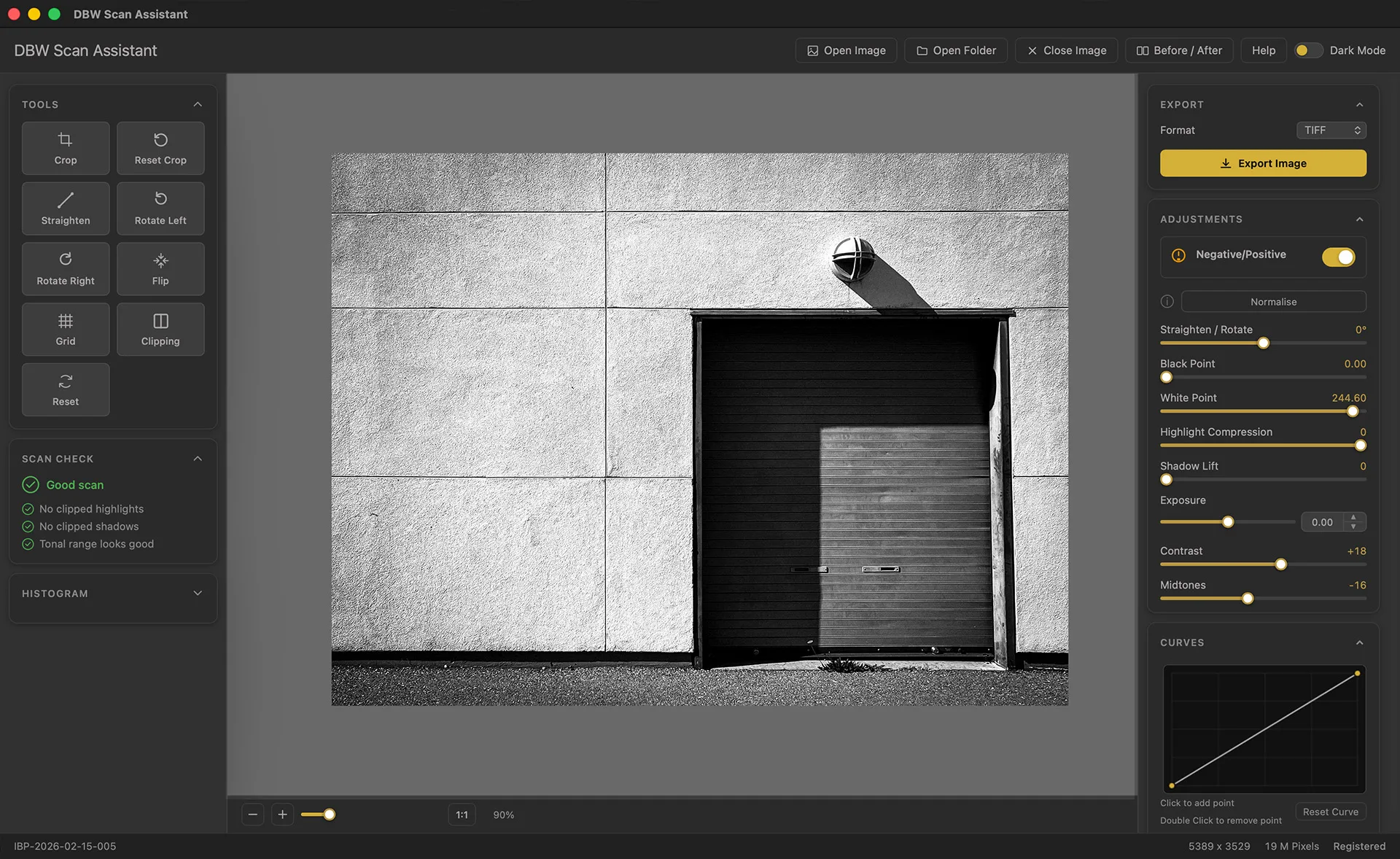
What You Actually Need for Black & White Negative Conversion
When you’re converting scanned negatives, you’re solving a specific problem:
- Fast inversion: Convert from negative to positive instantly
- Tonal control: Adjust blacks, midtones, and highlights after inversion
- No complex workflow: One tool, one image at a time (or batch mode)
- Consistent results: Apply the same conversion logic across an entire roll
- Export flexibility: Save as TIFF, JPEG, or PNG without quality loss
You don’t need layer masks, clone tools, or a thousand adjustment options. You need the conversion done right, without Photoshop’s complexity.
Introducing DBW Scan Assistant
DBW Scan Assistant is a standalone desktop application built from the ground up for one job: converting and refining scanned black and white film negatives.
Fine Tune After Conversion
Once inverted, you get a focused set of tools for what matters:
- Adjust black point, shadow detail, midtone density, and highlight rolloff
- Correct your scanner’s gamma response
- Refine specific tonal ranges without posterization
Works on Its Own
No Photoshop subscription. No Lightroom required. Install it on Windows or Mac, open your scans, and start working. One-time purchase. Forever.
Built for Film Photographers
DBW Scan Assistant isn’t a hobbled version of a general photo editor. It’s purpose built for the film digitization workflow
Who Should Use DBW Scan Assistant?
You’re the right fit if you:
- Digitize black and white film at home using a DSLR or a film scanner
- Shoot film regularly and want a faster, more predictable workflow
- Want to avoid Photoshop because of cost, complexity, or both
- Process multiple rolls
- Care about tonal accuracy
Instant Negative to Positive Conversion
Open your DSLR scan, and DBW Scan Assistant automatically detects and inverts the negative. No manual curve adjustments needed. The conversion respects the tonal structure of your film, preserving the zone system information embedded in your scan. Single image or drag an entire folder
2. DBW Scan Assistant converts negative to positive in seconds
3. Check the tonal range; most scans are ready to go
4. Fine-tune (if needed)
5. Export high-quality TIFF for archiving, or JPEG for sharing
6. Move to next image
Includes
- Perpetual license (yours forever)Free updates
- Free email support
- Try the full version before you buy no credit card required
Why not a subscription?
Because I believe photography tools should be yours to keep, not rented indefinitely.
FAQ: Black & White Negative Conversion
Q: Will DBW Scan Assistant work with my scanner model?
A: If you can export a TIFF or JPEG from your scanner, DBW Scan Assistant will work.
Q: Do I need Photoshop?
A: No. DBW Scan Assistant is completely standalone. You don’t need Photoshop, Lightroom, or any other subscription software.
Q: Can I batch-convert an entire folder of negatives?
A: Yes. Open a folder, and DBW Scan Assistant will convert all images using consistent settings. You can then refine individual images if needed.
Q: What file formats does it support?
A: Input: TIFF, JPEG, PNG, RAW. Output: TIFF, JPEG, PNG.
Q: Can I undo my changes?
A: Yes. All adjustments are non-destructive until you export. Close without saving to revert to the original scan.
Q: Is there a Mac version?
A: Yes. DBW Scan Assistant runs on both Windows and Mac (Intel and Apple Silicon). One license covers both.
Summary:
If you digitize black and white film negatives:
- DBW Scan Assistant handles conversion automatically
- Process negatives at home in minutes
- Dedicated gamma correction ensures consistency
DBW Scan Assistant is purpose built for one job: converting and refining scanned black and white film negatives.
Download the free trial today. Use your own negative scans, explore the workflow
Download Latest Version of DBW Scan Assistant
Note: Apple Mac Requires macOS 11 (Big Sur) or later.