DBW Scanner
Gamma 1.0 Linear Scanning
For Black & White Film
DBW Scanner is dedicated scanning software designed specifically for black & white film photographers using supported Epson flatbed scanners.
Supported Scanners
DBW Scanner only supports the Epson Perfection V800 / V850 / V700 / V750 family, connected directly by USB.
DBW Scanner uses a custom made scanner driver and is built specifically for Epson transparency scanners that use the supported direct USB control path. This is what allows the app to create predictable 16-bit greyscale TIFF negatives for DBW Linear Scans.
None Supported Scanners
If your scanner is not listed, it is not supported.
Linear Scanning for Black & White Film
Unlike conventional scanning software, DBW Scanner is designed to do one specific job:
Create a true Gamma 1 linear scan of your black & white negative.
No gamma correction is applied to make the scan look more pleasing. No contrast curve is added to create a finished looking image.
What you get is the linear data captured from the negative, saved as a 16-bit greyscale TIFF and ready for the next stage of your workflow.
What Does Gamma 1 Actually Mean?
Most scanning software applies a gamma adjustment to the raw scanner data before you ever see the image.
That can make the scan look more natural on screen, but it also means you are no longer working with the original linear relationship between the light measured by the scanner and the values stored in the image.
DBW Scanner takes a different approach.
The output is Gamma 1.0
This means the scan remains linear. The tonal values have not been gamma encoded simply to make the image look correct on a monitor.
As a result, your initial scan may look dark or unusual compared with a conventional scan.
That's exactly what you should expect from a Gamma 1 linear scan.
It isn't intended to be the finished photograph. It is the digital starting point from which the negative can be converted and interpreted.
One Job. A Gamma 1.0 Linear Scan.
DBW Scanner isn't intended to replace general-purpose scanning software.
It doesn't try to be everything to everyone.
It has been developed specifically to produce Gamma 1 linear scans from black & white film using supported Epson scanners.
That means no:
Gamma correction
Automatic contrast enhancement
Tone curve designed to make the scan look finished
Colour processing
Creative interpretation of your negative
Instead, DBW Scanner concentrates on capturing the negative as a 16-bit greyscale Gamma 1 linear TIFF.
Gamma 1.0 Linear
Capture a Gamma 1.0 scan of your black and white negative
16 Bit Greyscale Files
Your scans are saved as 16-bit greyscale Tiff files for maximum tonality
No Auto Corrections
No contrast adjustments for a cleaner neutral scan ready for conversion
Why Scan at Gamma 1.0
A conventional scanner workflow often tries to give you an image that already looks reasonably good when it appears on screen.
A linear workflow has a different objective.
The scanner captures the information first.
The interpretation happens afterwards.
By keeping the scan at Gamma 1, DBW Scanner provides a predictable linear starting point for subsequent conversion and image processing.
This also means you don't need to make creative tonal decisions while you're scanning.
Scan the negative first.
Decide what the photograph should look like later.
Don't Judge how it looks
This is important.
When you first see a Gamma 1 scan, you may wonder why it doesn't look like a normal photograph.
That's because your monitor and most image-viewing workflows are not displaying linear image data in the way we naturally expect a finished photograph to appear.
A Gamma 1.0 scan is not supposed to be the finished image.
The important thing at the scanning stage is capturing the negative's useful tonal information without applying an output gamma simply to make it look attractive on screen.
The image is then converted and processed during the next stage of the workflow.
DBW Scanner + DBW Linear Scans
This is where the two applications fit together.
DBW Scanner creates the Gamma 1.0 linear scan.
DBW Linear Scans converts that linear negative into a positive image and provides the appropriate starting point for further editing.
The workflow becomes:
Black & white negative → Gamma 1.0 linear scan → Convert to positive → Edit your photograph
- DBW Scanner handles the capture.
- DBW Linear Scans handles the conversion.
- Your image editor handles the creative interpretation.
Each stage has a clearly defined job.
16-bit Greyscale Gamma 1.0 TIFF
DBW Scanner saves your negative as a 16-bit greyscale TIFF with Gamma 1 linear data.
The 16-bit file provides the tonal precision needed for subsequent processing while the Gamma 1 workflow preserves the linear nature of the captured scan.
There is no need to deliberately make the scan look good at this stage.
The scan is the source material, not the finished photograph.
Why Not Just Use a "Raw" Setting in Normal Scanner Software?
A setting described as RAW, neutral or uncorrected does not necessarily mean that the resulting image contains Gamma 1 linear data.
Scanner software may still apply gamma encoding or other processing as part of its normal imaging pipeline.
DBW Scanner removes that uncertainty.
Its purpose is explicit:
To create a Gamma 1 linear black & white scan from a supported scanner.
You know what your starting point is before you begin processing the image.
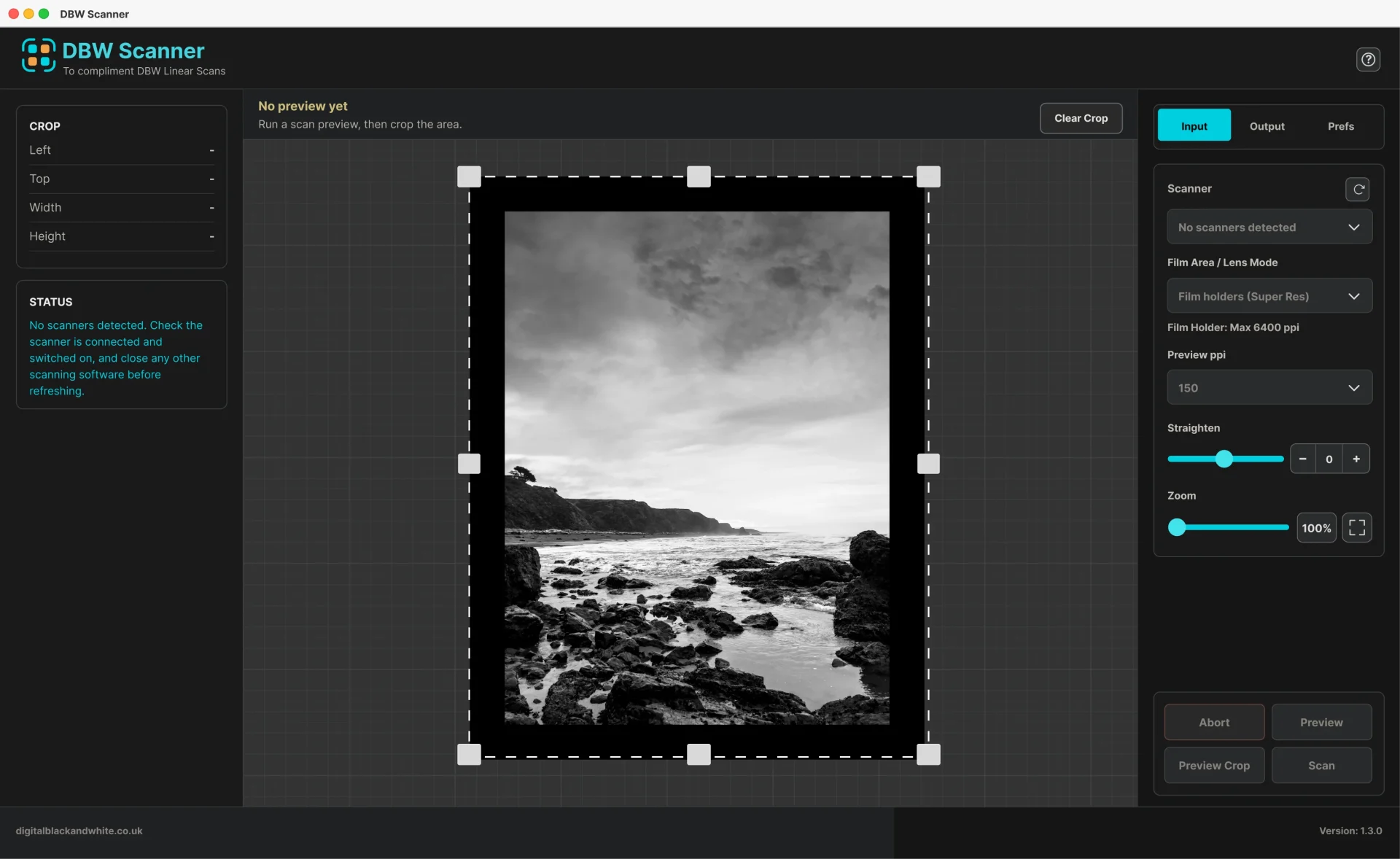
A Simple Linear Scanning Workflow
1. Load your black & white negative
Place your film in the scanner using your normal film holder.
2. Preview
Preview the negative and select the frame you want to scan.
3. Set your scan
Choose your required resolution and scanning parameters.
4. Make the Gamma 1.0 scan
DBW Scanner captures the negative as linear Gamma 1.0 data.
5. Save your 16-bit TIFF
You now have a Gamma 1.0 linear scan ready for conversion and processing.
Known Starting Point
The philosophy behind DBW Scanner is deliberately simple.
Don't ask the scanner to make the photograph.
Ask it to capture the negative.
A Gamma 1.0 linear scan gives you a defined, predictable starting point before conversion and creative editing begin.
- Your negative
- Your data
- Your interpretation
DBW Scanner
- one time license purchase
- Windows and macOS
- Free app updates