12 months Access to all Photoshop Plugins
For one simple annual payment you get unlimited access to the complete collection of Photoshop plugins, every Photoshop plugin I offer, including anything new I release during your membership.
- Full access to all current Photoshop plugins
- Any new plugins added at no extra cost
- Instant downloads, no waiting
- Use across your own projects straight away
If you were to buy each plugin individually you'd spend far more — the All Access Pass is the best value way to get the complete toolkit.
Paper Grey Curves
Or Get Instant Access to all Photoshop Plugins for 1 year.
Epson ABW Paper Grey Curves Photoshop Plugin
When printing black and white images through the ABW driver, we don’t use the standard ICC color profiles because those profiles are based on the RGB driver, not the ABW driver. In fact, in Photoshop we use the “let the printer manage the colors option
This means that your images’ RGB values are passed directly to the ABW driver unmodified. For example, if you place the eyedropper in Photoshop over a pixel and find that it has RGB values (240,240,240), then (240,240,240) is exactly what Photoshop will give to the ABW driver.
There are a few issues with this approach, and they all have to do with the fact that the output process isn’t color-managed so in order to compensate for the discrepancy, we build and use a custom black-and-white correction curve with the Paper Grey Curves Photoshop Plugin
Creating a custom print curve with the Paper Grey Curves Photoshop plugin will help to iron out the wrinkles from the discrepancies we get between the pixel values we send to the Epson ABW driver to the pixel values we see in the final print.
Paper Grey Curves Plugin Components
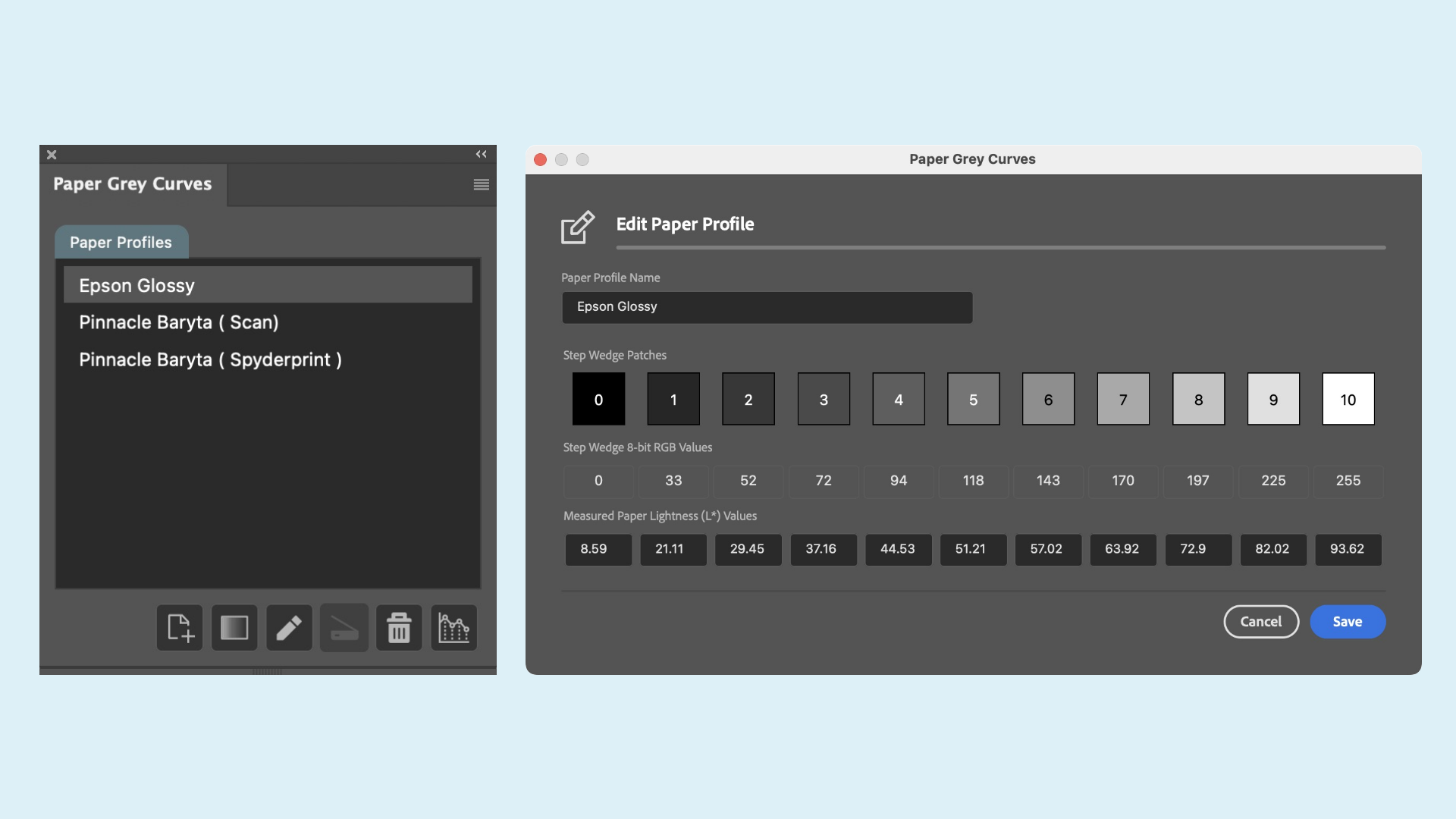
The plugin comprises of three main components, each one is extremely intuitive and easy to use. We start by creating a paper profile for the paper you are using, then we create the step wedge from within the plugin, print it and let it dry.
We then enter the data from the step wedge patches and create the correction curve. It really is that easy.

Paper Grey Curves Paper Profiles
Create individual paper profiles for your favourite papers you like to print on with the Epson ABW driver.
No More Having To Hunt Around For The Step Wedge Data.
By storing the information form the measured step wedge patches directly into the paper profile dramatically speeds up the process when creating the final correction curve.
Create as many profiles as you need. You also have the option to export and import the profiles which is ideal for creating backups should you ever need them in the future.

Create Step Wedge
Creating the step wedge is the second part of the process as we use the values from the print to create the final correction curve.
After the step wedge is printed and given time to dry each of the patches are measured with our hardware measuring device.
In version 3.1 we have also included the option to use a flatbed scanner to scan the step wedge and the plugin will automatically measure the values for you and write them into your slected profile.

Print Correction Curve
Creating the correction curve is extremely easy in version 3.1 of Paper Grey Curves because we no longer rely on an external spreadsheet to perform the complicated calculations for us as they are now built right into the plugin.
Choose between creating the curve directly onto the active document or choose to have it created onto a new blank document.

Paper Grey Curves FAQ