12 months Access to all Photoshop Plugins
For one simple annual payment you get unlimited access to the complete collection of Photoshop plugins, every Photoshop plugin I offer, including anything new I release during your membership.
- Full access to all current Photoshop plugins
- Any new plugins added at no extra cost
- Instant downloads, no waiting
- Use across your own projects straight away
If you were to buy each plugin individually you'd spend far more — the All Access Pass is the best value way to get the complete toolkit.
Easy Dodge And Burn
Or Get Instant Access to all Photoshop Plugins for 1 year.
Easy Dodge & Burn Photoshop Plugin
Dodging and Burning is a technique originating in the black and white darkroom. Primarily it was a needed to add interest to an image that might otherwise look “flat”.
Typically, a lot of black and white photograpghs would lack contrast and appear lifeless when printed. By Dodging and Burning it was possible to enhance the photos to make areas more prominent and features stand out.
By applying Dodging and Burning to selected areas of an image, you can lighten or darken them. When we view a photograph, our brains work by subconsciously directing our eyes more towards light areas and away from the dark.
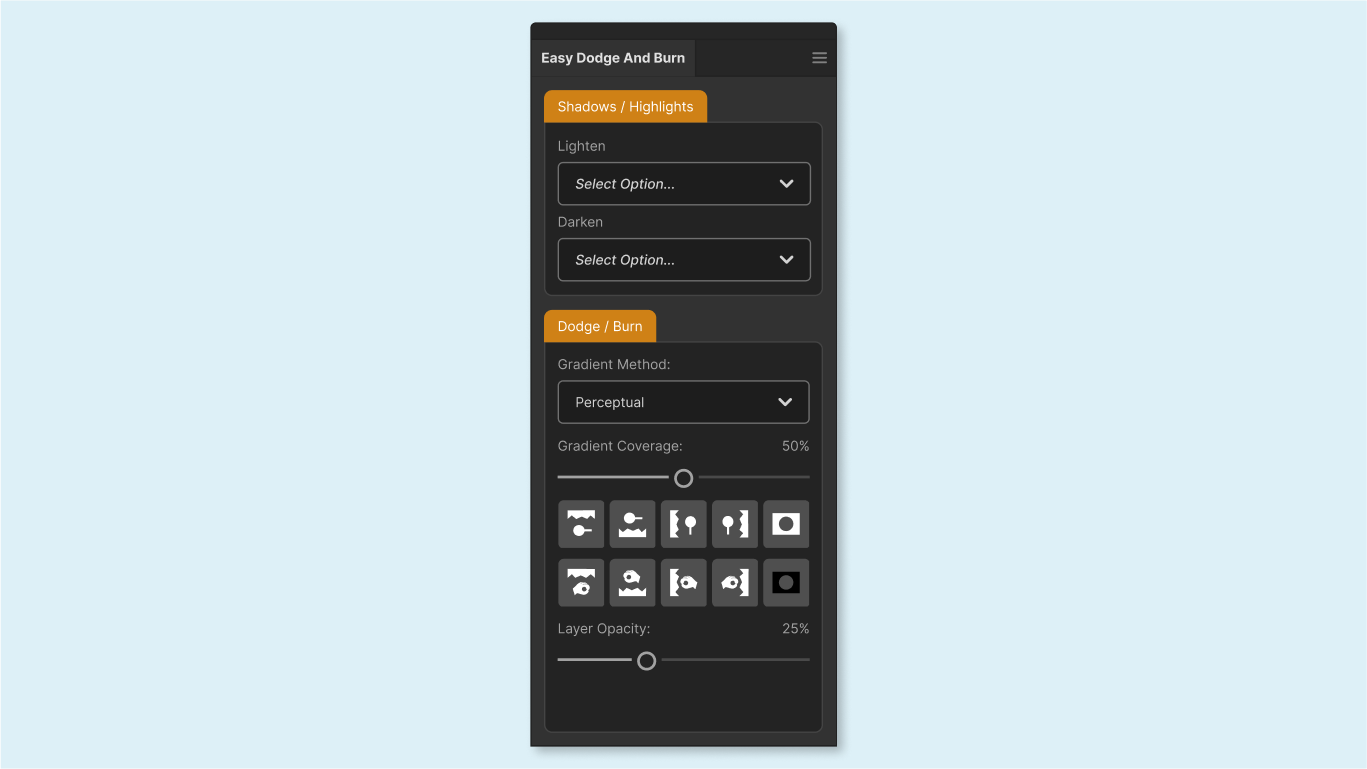
Understanding this helps to unconsciously direct our viewers’ attention.Easy Dodge And Burn Photoshop is a lightweight plugin designed to work with Photoshop version 24 and newer. Darkening or lightening parts of the image is extemely easy and is done by using the various options found inside the plugin.
Dodge & Burn Shadows and Highlights
In the top section of the plugin, we have the option to Burn or Dodge either the shadows or the highlights within the image.
This is accomplished by selectively targeting those areas using the power of 16bit luminosity masks rather that the older 8bit selections.
Options include:
- Lighten Shadows (3 variations)
- Lighten Highlights (3 variations)
- Darken Shadows (3 variations)
- Darken Highlights (3 variations)

Dodge & Burn Fade
In the lower section we have a series of presets which target different areas of the image using the dodge and burn fade method.
Areas include: