Camera MetaData Editor
Buy Camera MetaData Editor
Batch edit camera and lens metadata across many photos
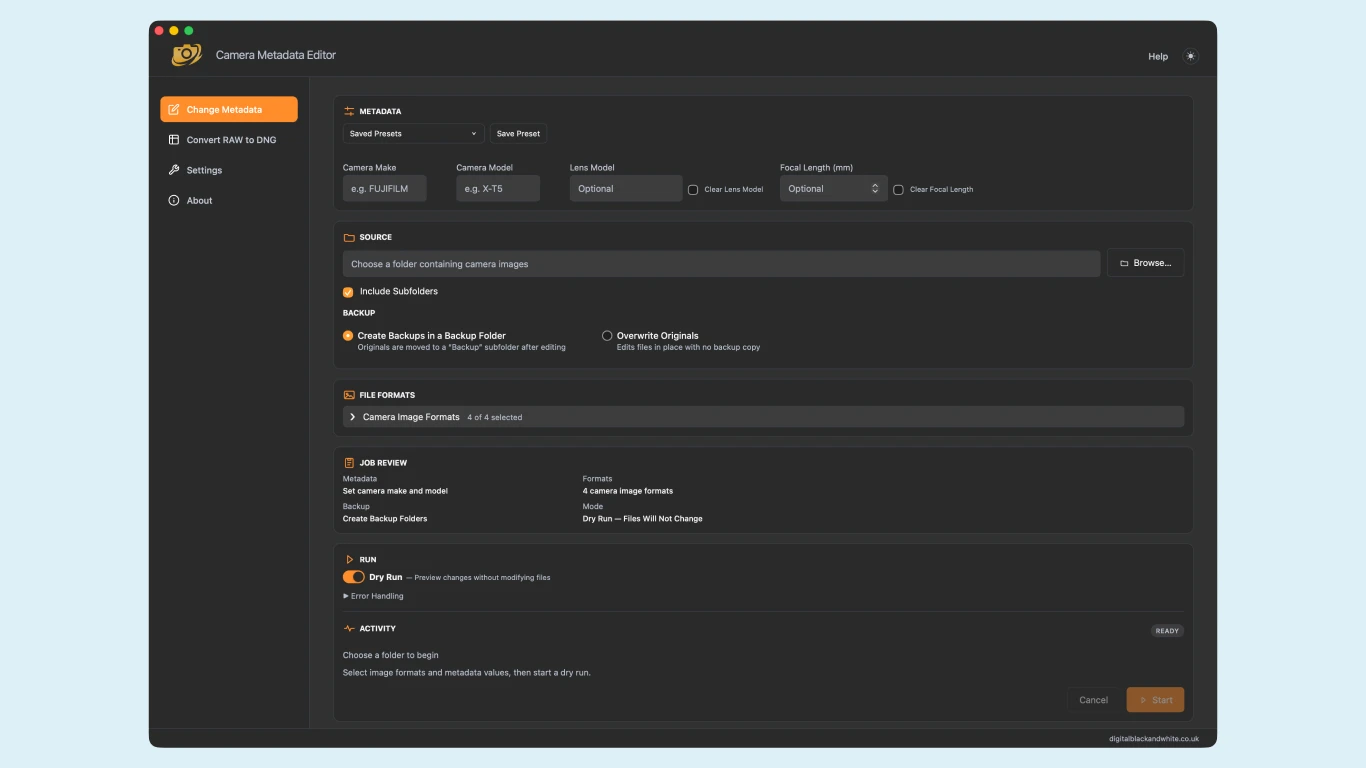
Camera Metadata Editor is a desktop application that updates camera metadata in batches. Whether you're organising a photo archive, updating metadata after converting RAW files to DNG, or adding lens information to images taken with vintage lenses, Camera Metadata Editor makes the process fast, safe and straightforward.
Update the camera make, camera model, lens model and focal length across an entire folder in just a few clicks.
Designed for photographers, film scanning enthusiasts and digital archivists, Camera Metadata Editor includes a Dry Run mode so you can preview every change before writing metadata to your files.
Why choose Camera Metadata Editor?
- Batch edit camera metadata across entire folders
- Update Camera Make and Camera Model
- Add, change or remove Lens Model
- Add, change or remove Focal Length
- Supports JPEG, TIFF, DNG and HEIF image formats
- Dry Run mode previews changes before editing
- Automatic Backup mode keeps your original files safe
- Restore original files directly from the application
- Save reusable metadata presets
- Detailed activity log with export option
- Available for Windows and macOS
- One time purchase, no subscription
Perfect for
- Film scanning workflows
- Adobe DNG Converter workflows
- Vintage and manual focus lenses
- Large image libraries
- Digital archives
- Museum collections
- Studio photography
- Travel photographers
- Stock photographers
- Anyone who needs consistent camera metadata
Safe by design
Camera Metadata Editor is designed to protect your image library.
Start with a Dry Run to preview every proposed change without modifying your files. When you're ready, Backup mode automatically preserves the original versions, allowing you to restore them later if required.
Supported image formats
- JPEG (.jpg, .jpeg, .jpe)
- TIFF (.tif, .tiff)
- Digital Negative (.dng)
- HEIF (.heic, .heif, .hif)
Common uses
Update metadata after converting RAW files to DNG
Keep your DNG files organised by updating camera and lens information after conversion.
Add lens information to manual lenses
Record the correct lens model and focal length for adapted and vintage lenses.
Standardise large photo libraries
Apply consistent camera information across thousands of images in minutes.
Organise scanned film archives
Replace generic scanner metadata with meaningful camera and lens information.
| Feature | Included |
|---|---|
| Batch editing | ✓ |
| Dry Run preview | ✓ |
| Automatic backups | ✓ |
| Restore backups | ✓ |
| Camera Make editing | ✓ |
| Camera Model editing | ✓ |
| Lens Model editing | ✓ |
| Focal Length editing | ✓ |
| Saved presets | ✓ |
| Activity logs | ✓ |
| Windows | ✓ |
| macOS | ✓ |
| Convert RAW to DNG | ✓ |
| Subscription | None |