BW Negative Converter

Buy BW Negative Converter
Convert black and white negatives Lightroom Classic
A simple, practical plugin for photographers who digitise black and white film with a DSLR or mirrorless camera and want a cleaner workflow from negative to positive.
BW Negative Converter helps you turn your photographed black and white negatives into editable positive images without leaving Lightroom Classic. Instead of relying on awkward workarounds or overly technical methods, you get a more direct route to a strong starting point for further editing.
What it does
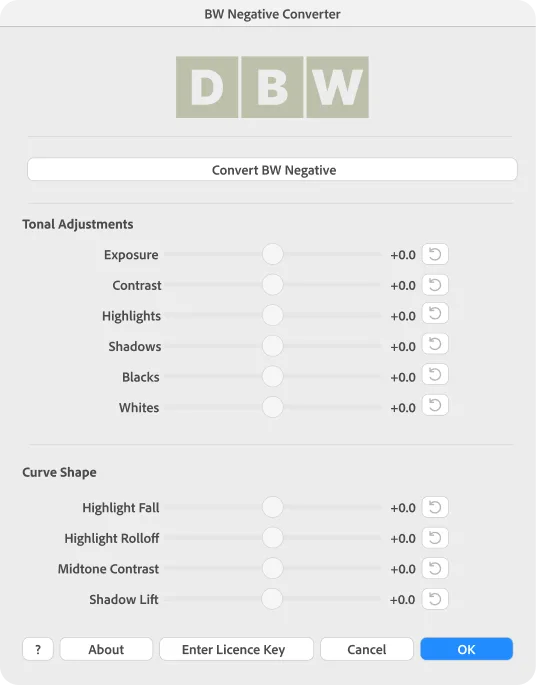
BW Negative Converter converts photographed black and white negatives into positive files inside Lightroom Classic.
It is designed to give you a solid starting conversion quickly, so you can move on to the creative part of editing with a clean, natural base image.
Why I made it
Converting black and white negatives inside Lightroom Classic can feel far more fiddly than it should. Many workflows are slow, inconsistent, or simply not pleasant to use. BW Negative Converter was created to make that process easier. It gives you a dedicated tool for black and white negative conversion while keeping you in the Lightroom environment you already know.
Why choose BW Negative Converter
There are plenty of ways to convert negatives, but many of them feel improvised. BW Negative Converter is focused on making one part of the process easier and more reliable.
It fits naturally into a digital camera scanning workflow and keeps the experience simple. If your goal is to convert black and white negatives inside Lightroom Classic without needless friction, this plugin gives you a far more direct solution.
How to install
- Download the plugin to your Mac or PC.
- If the plugin arrives as a zip file, unzip it first. Make sure you can see the plugin folder ending in
.lrplugin. - Open Lightroom Classic. Go to File then Plug in Manager.
- In the Plugin Manager window, click Add.
- Browse to the plugin folder you unzipped. Select the folder that ends in
.lrplugin, then click Add Plug in. - Lightroom Classic should now load the plugin and show it in the Plugin Manager list.
- Check that the status says the plugin is installed and running properly.
- Click Done to close Plugin Manager.
Select the photograph you want to convert in Lightroom Classic, switch to the Develop module, then choose File > Plug in Extras > BW Negative Converter from the top menu.